EngineeringMar 03, 2026
Publishing a Private npm Package Using GitHub Actions (Complete Guide)
In this guide, I’ll show how to:
- Create a private npm package
- Publish it to GitHub Packages
- Automate publishing using GitHub Actions
- Install it securely in another project
🧱 Step 1 — Create a Private Repository
- Go to GitHub
- Click New Repository
- Enter a name (example:
your-package-name) - Select Private
- Click Create Repository
💻 Step 2 — Initialize Package Locally
Inside your project folder:
npm init -y
📄 Step 3 — Create index.js
const sayHello = function(name){
  console.log("hello " + name + "!")
}

module.exports = {
  sayHello
}
🏷 Step 4 — Update package.json
GitHub Packages requires scoped package names. Update your package.json:
{
  "name": "@your-github-username/your-package-name",
  "version": "1.0.0",
  "main": "index.js",
  "publishConfig": {
    "registry": "https://npm.pkg.github.com"
  }
}
[!WARNING] Replace
your-github-usernameandyour-package-name.
Example:"name": "@yunus-karatt/your-package-name"
📤 Step 5 — Push to GitHub
git init
git remote add origin https://github.com/your-username/your-package-name.git
git add .
git commit -m "initial commit"
git push -u origin master
⚙️ Step 6 — Add GitHub Action (Using Actions Tab)
- Go to your repository
- Click Actions
- Click Set up a workflow yourself
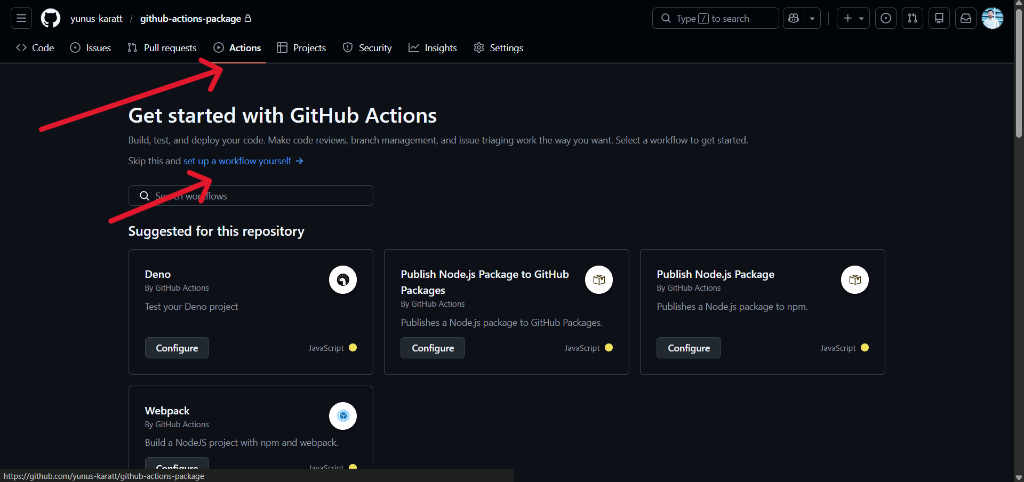
- Replace content with:
name: Publish Package

on:
  push:
    branches:
      - master

jobs:
  publish:
    runs-on: ubuntu-latest

    permissions:
      contents: read
      packages: write

    steps:
      - uses: actions/checkout@v3

      - uses: actions/setup-node@v3
        with:
          node-version: 18
          registry-url: https://npm.pkg.github.com
          scope: '@your-github-username'

      - run: npm install

      - run: npm publish
        env:
          NODE_AUTH_TOKEN: ${{ secrets.GITHUB_TOKEN }}
- Click Commit changes.
Now every push to master will publish automatically.
� Step 7 — Create a Personal Access Token (For Installing Package)
To install a private GitHub package, you must authenticate.
Create Token:
- Go to GitHub
- Click your profile photo → Settings
- Go to Developer settings
- Click Personal access tokens → Tokens (classic)
- Click Generate new token (classic)
- Select scopes:
- ✅
read:packages
- ✅
- Generate token and copy it (you won’t see it again).
📦 Step 8 — Install the Private Package
Inside the project where you want to use it:
Create .npmrc
@your-github-username:registry=https://npm.pkg.github.com
//npm.pkg.github.com/:_authToken=YOUR_PERSONAL_ACCESS_TOKEN
Replace
your-github-usernameandYOUR_PERSONAL_ACCESS_TOKEN.
Install
Using npm:
npm install @your-github-username/your-package-name
Using pnpm:
pnpm add @your-github-username/your-package-name
Using yarn:
yarn add @your-github-username/your-package-name
🧪 Step 9 — Use the Package
const { sayHello } = require("@your-github-username/your-package-name");

sayHello("Yunus");
Output:
hello Yunus!
🎯 What You Achieved
You built:
- A private scoped npm package
- Automated CI/CD publishing
- Secure installation using GitHub authentication
- Internal reusable library setup
This is exactly how companies manage shared UI components and internal tools.